Sweepr 2.0 · iPhone and iPad

Your camera roll,as a deck of cards.

One photo at a time, full screen. Swipe left to delete, right to keep. And the photos you would never delete, you can compress instead: same resolution, same date, same albums, a lighter file. Version 2.0 adds a home for the whole library, a trash you can take anything back from, duplicates side by side and video trimming.

Free to try, with 50 swipes a week. Pro removes the limit.

  • Nothing leaves your device
  • No account
  • No ads, no tracking
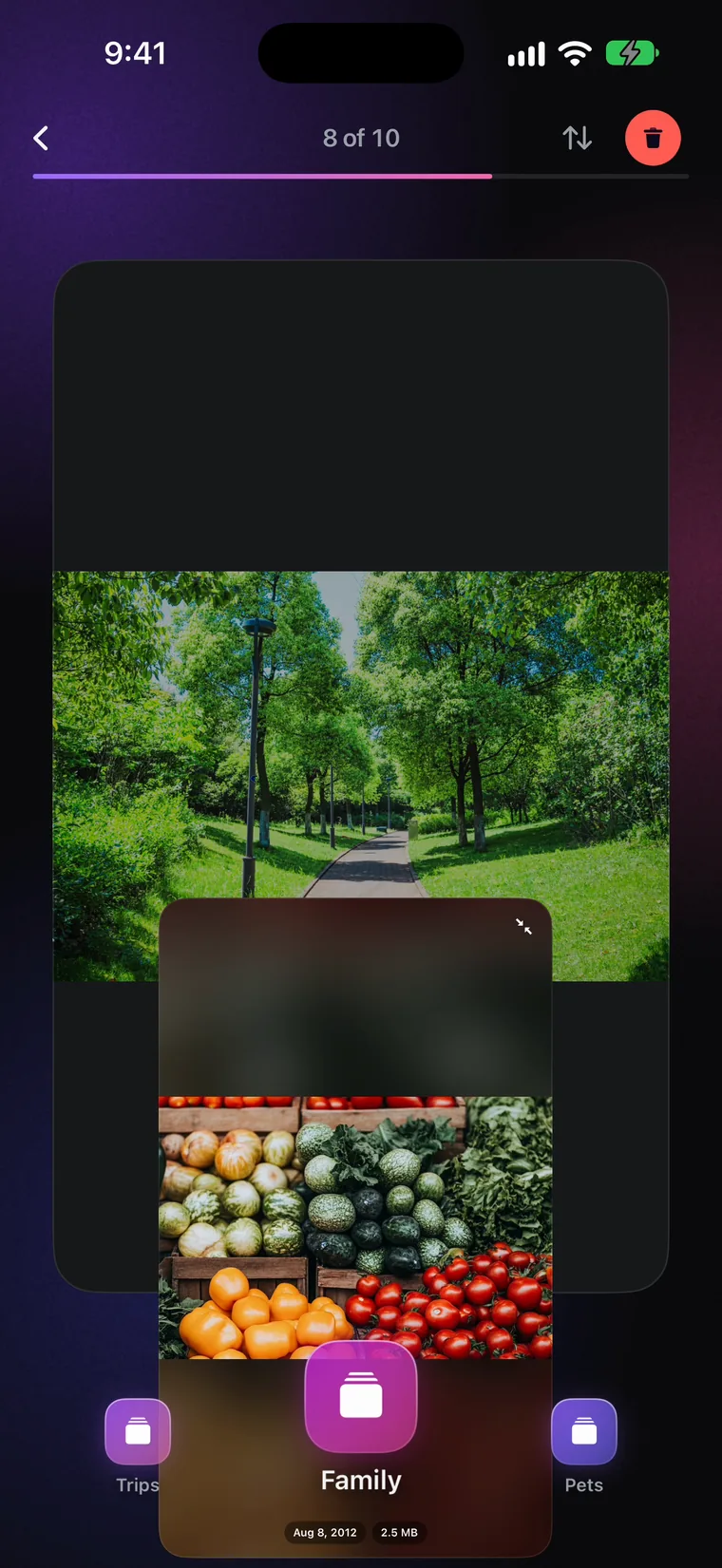
The deck: one photo full screen, 1 of 38, with Delete, Undo, More and Keep beneath it

The problem

Storage Almost Full is not a photo problem. It is a weight problem.

A phone does not fill up evenly. Most of your photos are small: an ordinary HEIC frame is two or three megabytes, and Sweepr will not even offer to compress it. The space is held by the minority of files that are enormous, the 4K clips and the RAW frames, and those are exactly the ones nobody wants to delete. Most cleaners answer that with one instruction: delete more. Sweepr gives you a second answer for precisely those files.

170 MBone minute of 4K video at 30 frames per second
75 MBone 48 megapixel ProRAW photo
20 MBhow heavy a photo has to be before Sweepr offers to compress it, out of the box

The deck

One card at a time. One decision at a time.

No lists, no checkboxes, no select all. Sweepr shows you one photo, full screen, and waits. The counter at the top says 1 of 38, so you always know how much is left, and Sweepr remembers what you have already reviewed, so a photo you have decided on does not come round again.

Swipe left to delete

For the screenshots, the burst of nine identical shots, the receipt you photographed in March. It goes into the trash at the top of the deck and waits there. Nothing is deleted until you leave the deck and confirm it, once, in the iOS prompt.

  • Undo takes back the last decision, and so does a double tap on the card
  • Open the trash to put back one photo, or all of them
  • Hold Keep to skip a photo without deciding

Swipe right to keep

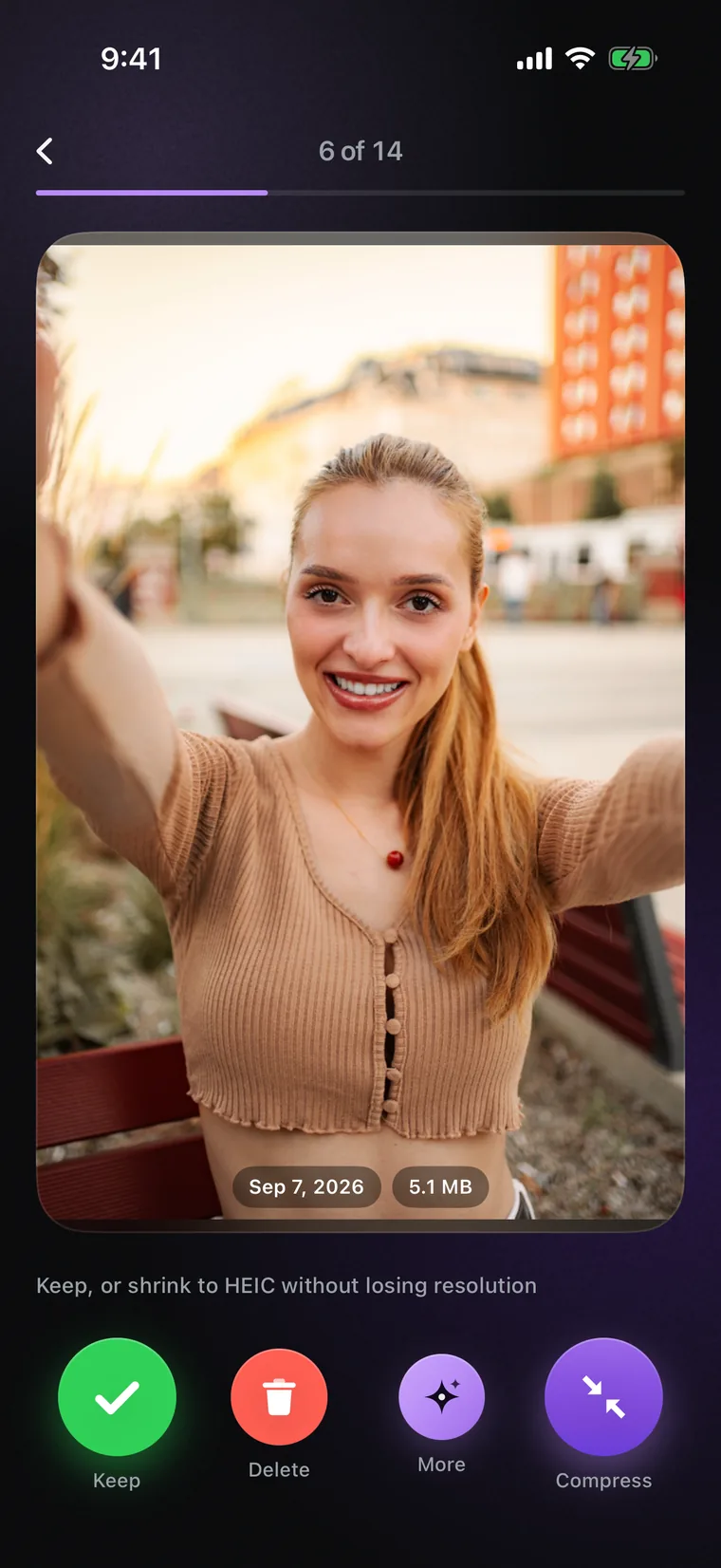
A kept photo stays exactly where it is. For the ones you would never delete but that weigh far too much, the compress button in the corner of the card makes the file lighter and leaves the picture as it was.

  • Swipe up to add a photo to Favourites without leaving the deck
  • The ✦ button: compress, trim, share, add to an album, see the details
  • Video plays in the card, with scrubbing, mute and 2x speed

Compression

You do not have to delete it. You can just make it lighter.

This is the part most cleaners skip. Sweepr rewrites the file, not the picture. A compressed photo comes out at exactly the resolution it went in at, with the same date, the same place and the same albums, and the heavy original goes into the trash once its copy is ready. How much a file gives back depends on what it was: a ProRAW frame or a PNG screenshot can lose a third of its size or more, while a photo already stored as efficient HEIC may have little left in it.

  • HEIC or JPEGThree quality levels: maximum, high and balanced. Maximum is the default.
  • Your own thresholdOnly photos above the size you set are offered for compression, 20 megabytes out of the box. Compress Large Photos on the home screen gathers all of them into one deck.
  • It refuses when it shouldIf a photo would not get meaningfully smaller, Sweepr leaves it alone and says it is already small enough. Live Photos are never compressed, because re-encoding one would lose its motion.
  • It asks firstCompressing from the main deck asks you to confirm. That is on by default, and Settings turns it off once you trust it.
The compression deck: a portrait with its date and file size, and Keep, Delete, More and Compress beneath it

Video

Video is the heaviest thing you own.

One minute of 4K costs about 170 megabytes at 30 frames per second, and roughly 400 at 60. Most of those clips are worth keeping, and plenty of them run longer than they need to. Sweepr gives you two ways to make a video smaller without leaving the deck: compress it, or trim it down to the part that matters.

  • Pick a sizeKeep a clip at its own size and just make it lighter, or step it down from 4K to 1080p or 720p. It stays in your library, on the same date, in the same albums.
  • Pick the qualitySame as original, Balanced or Compact, measured against the clip itself. Balanced is the default and hard to tell apart on a phone. The frame rate can stay as it is, or drop to 30 or 24.
  • Trim the dead minutesCut a long clip down to the seconds you want. The trimmed copy takes the original's place, and the original goes into the trash. Three trims are free, and Pro makes them unlimited.
  • Biggest firstLarge Videos on the home screen lists your heaviest clips by size, so the quickest wins come first.
A video card with the size picker open: 4K lighter, 1080p and 720p

Home

See what fills your iPhone.

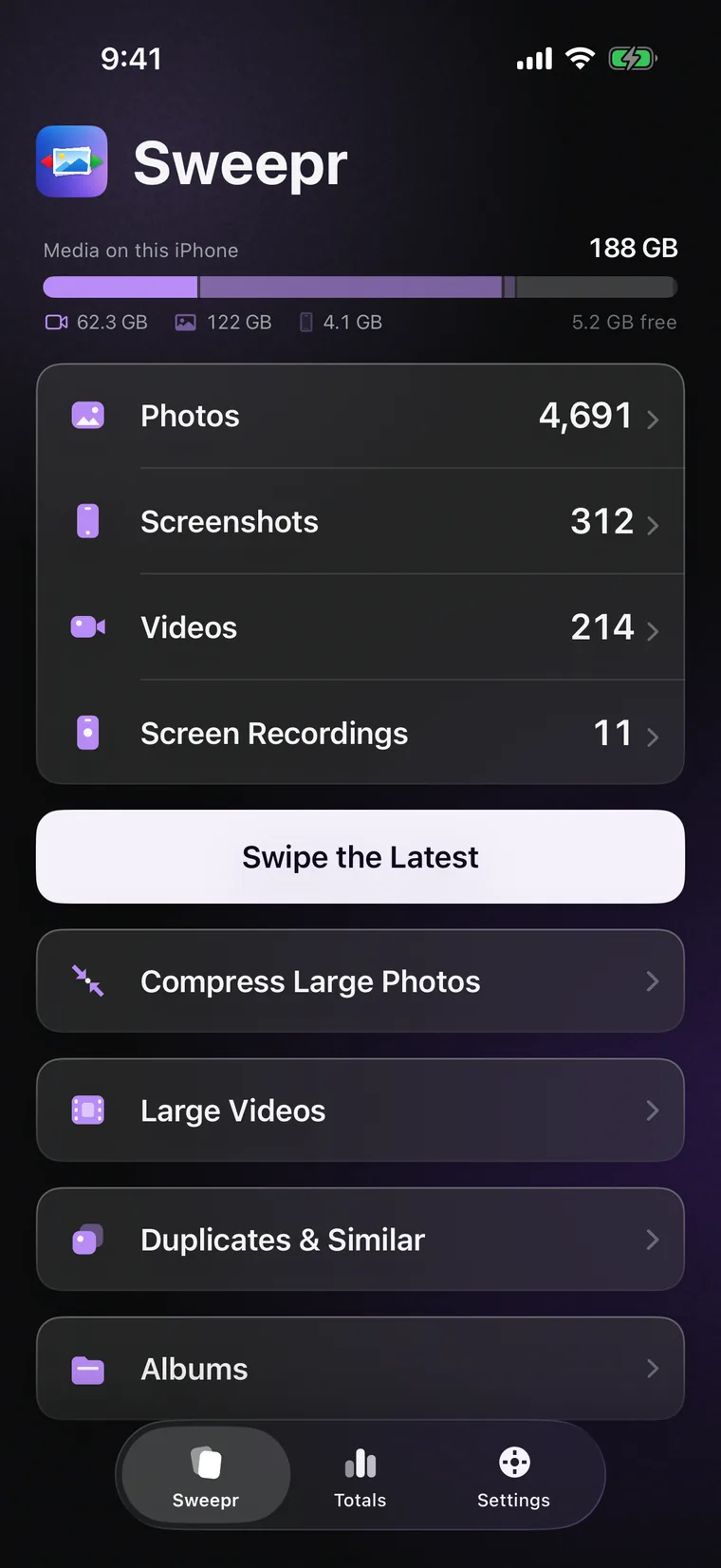
Sweepr 2.0 opens on your library rather than on a deck. A bar at the top shows how much of the phone your photos and videos take. Photos, Screenshots, Videos and Screen Recordings each have a row of their own, laid out by year, month and day. Pick one day, one month, a whole year or just the latest, and start swiping.

  • Swipe the Latest, or one day, one month, a whole year
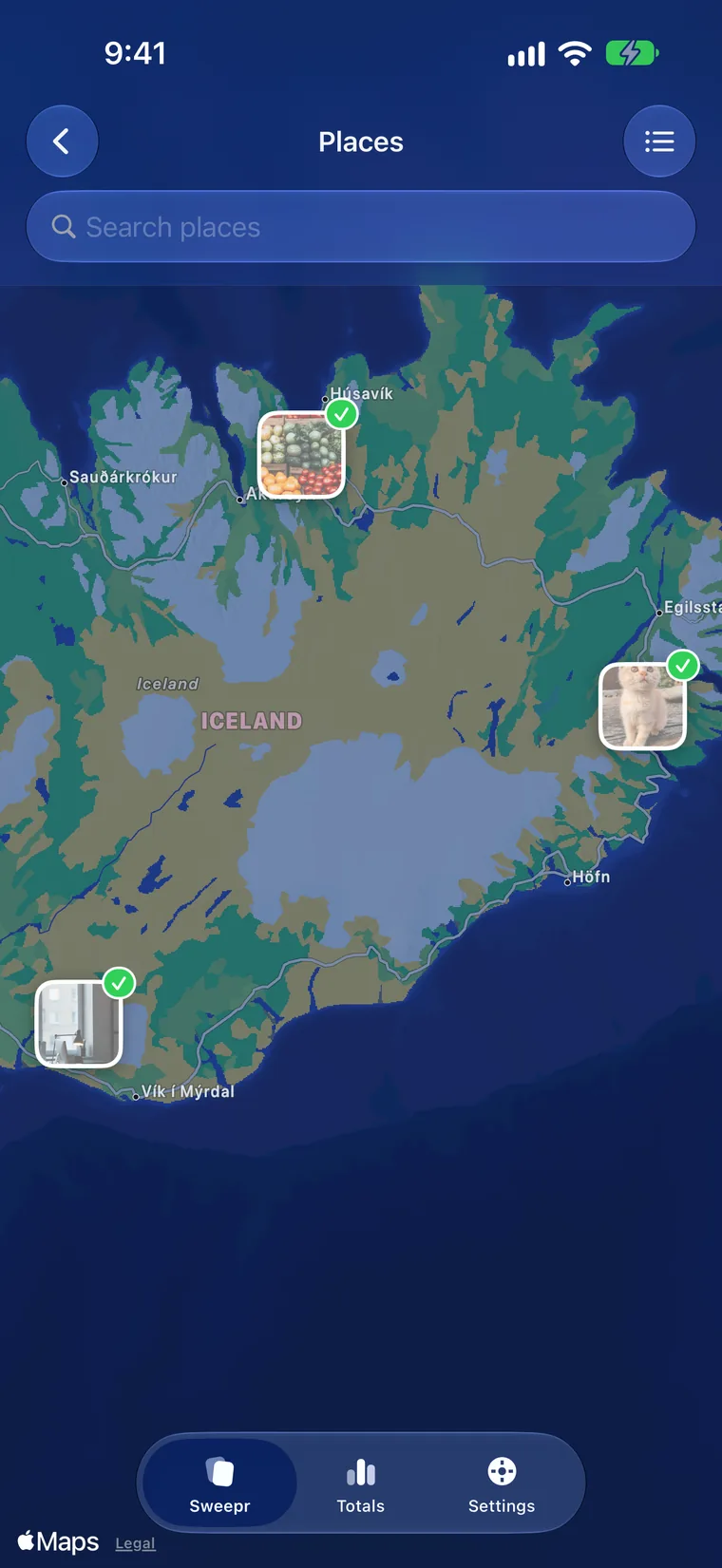
  • Albums: Favourites, Selfies, Live Photos, Panoramas, Bursts, Portrait and your own
  • Large Videos and Duplicates & Similar as sections of their own
  • Sweepr remembers what you have reviewed and picks up where you stopped
The home screen: how much of the phone media takes, rows for Photos, Screenshots, Videos and Screen Recordings, and sections for large photos, large videos, duplicates and albums

Duplicates & Similar

Same shot, six times. Keep the one you like.

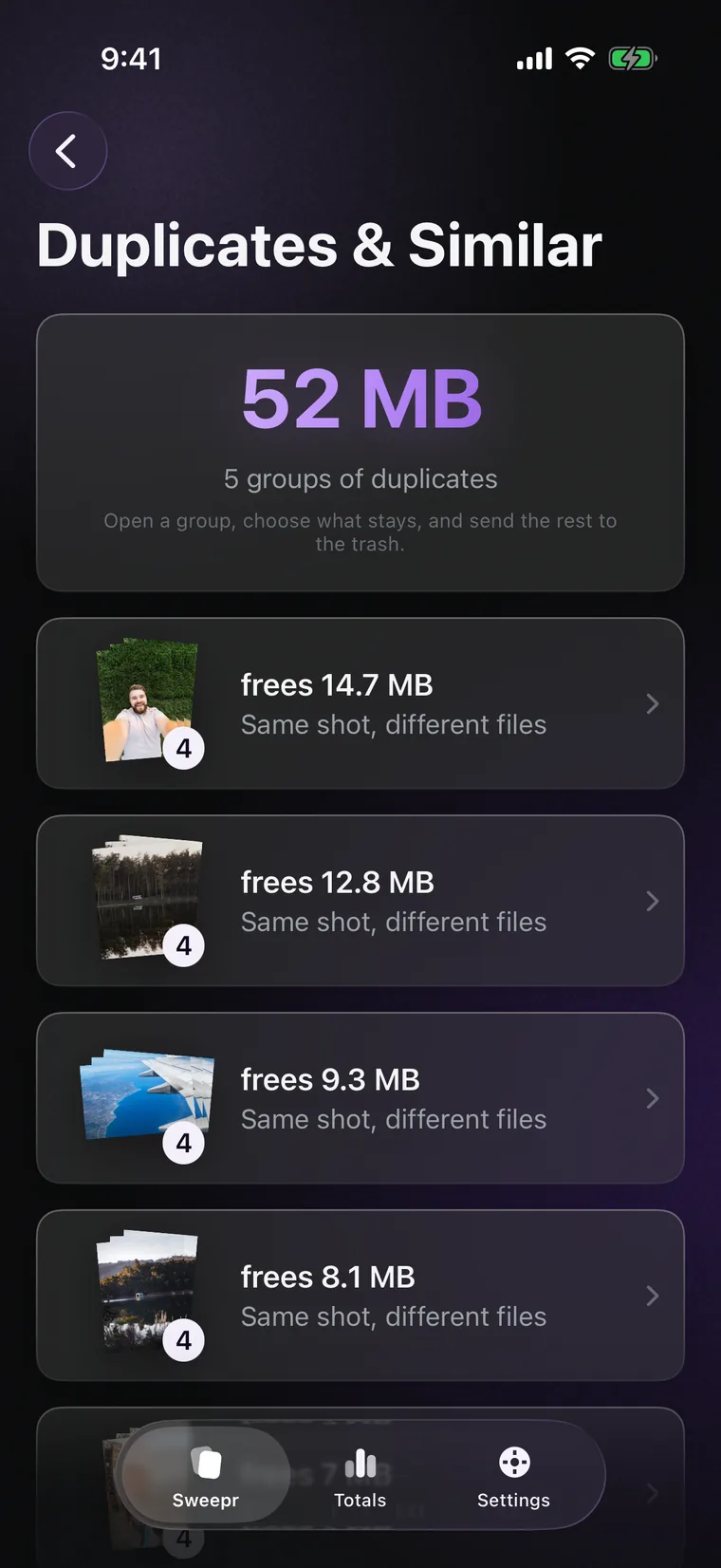
Bursts, near-identical frames, the same photo saved twice from a chat. Sweepr finds exact copies and photos that are nearly the same, puts each group side by side and lets you choose what stays. The rest goes into the trash, like any other left swipe.

  • Found on the phone, by comparing the photos themselves. Nothing is uploaded
  • Each group shows how much space it would free
  • You choose every time. Nothing goes automatically
  • Free, no Pro needed
Duplicates & Similar: groups of the same shot, each showing how much space it frees

The trash

Nothing is gone until you say so.

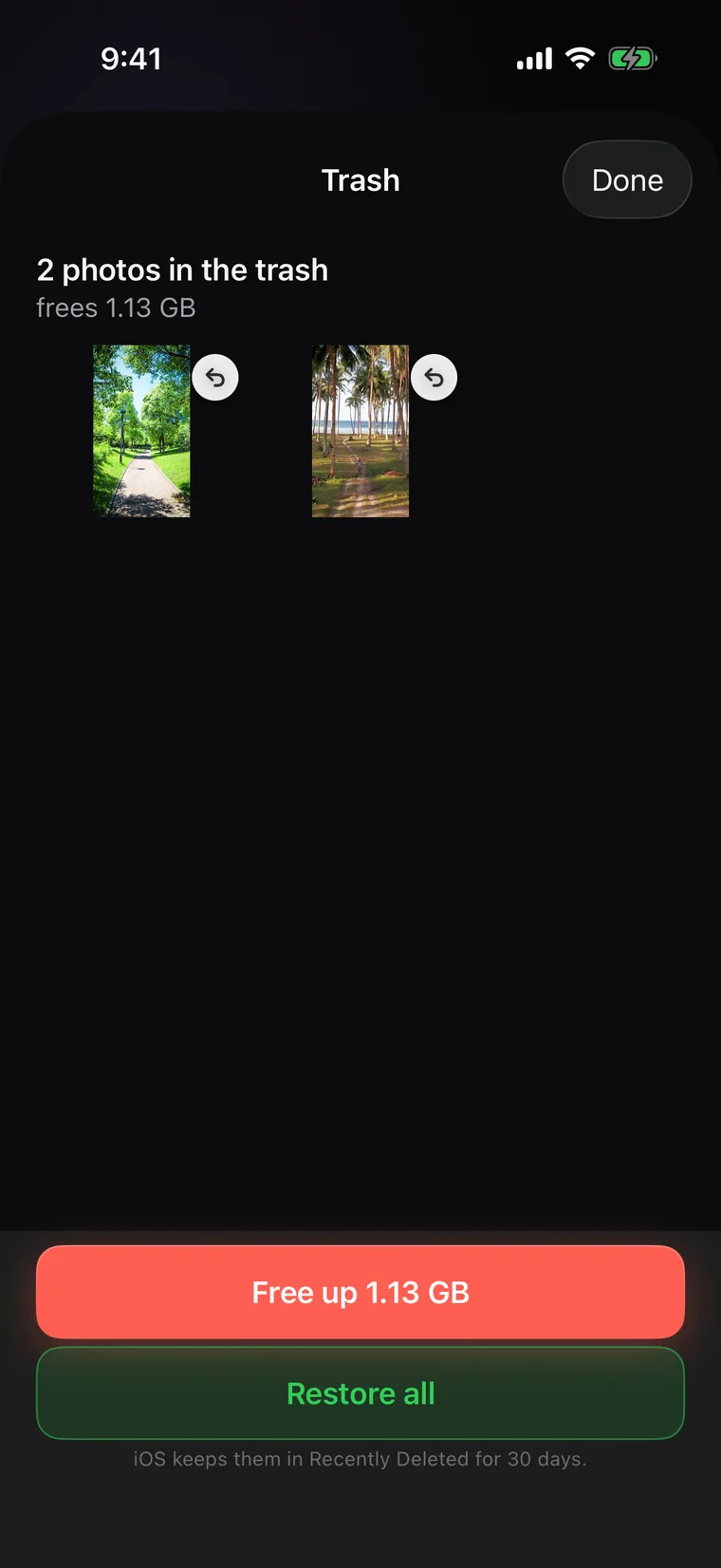
iOS asks for your permission every time an app deletes photos, and a prompt after every swipe would be unbearable. So left swipes wait in Sweepr's trash, at the top of the deck. Open it whenever you like to bring one back, or all of them. When you leave the deck, iOS asks once, and confirming is what actually frees the space.

  • One iOS confirmation per deck, not one per photo
  • Restore a single photo, or restore all
  • Originals of compressed and trimmed files wait in the same trash
The trash: two photos waiting, with Free up in red and Restore all in green

iPad

Made for iPad, in any orientation.

On iPad the deck is sized to the screen, not to a phone: a big photo, the header across the full width, and it turns to landscape as well as portrait. Home, Totals and Settings sit in a comfortable column in the middle of the screen.

  • Portrait or landscape, all four ways round
  • Wider grids for months, days and large videos
Sweepr on iPad in landscape, with the deck sized to the screen

Totals

See how much space you got back.

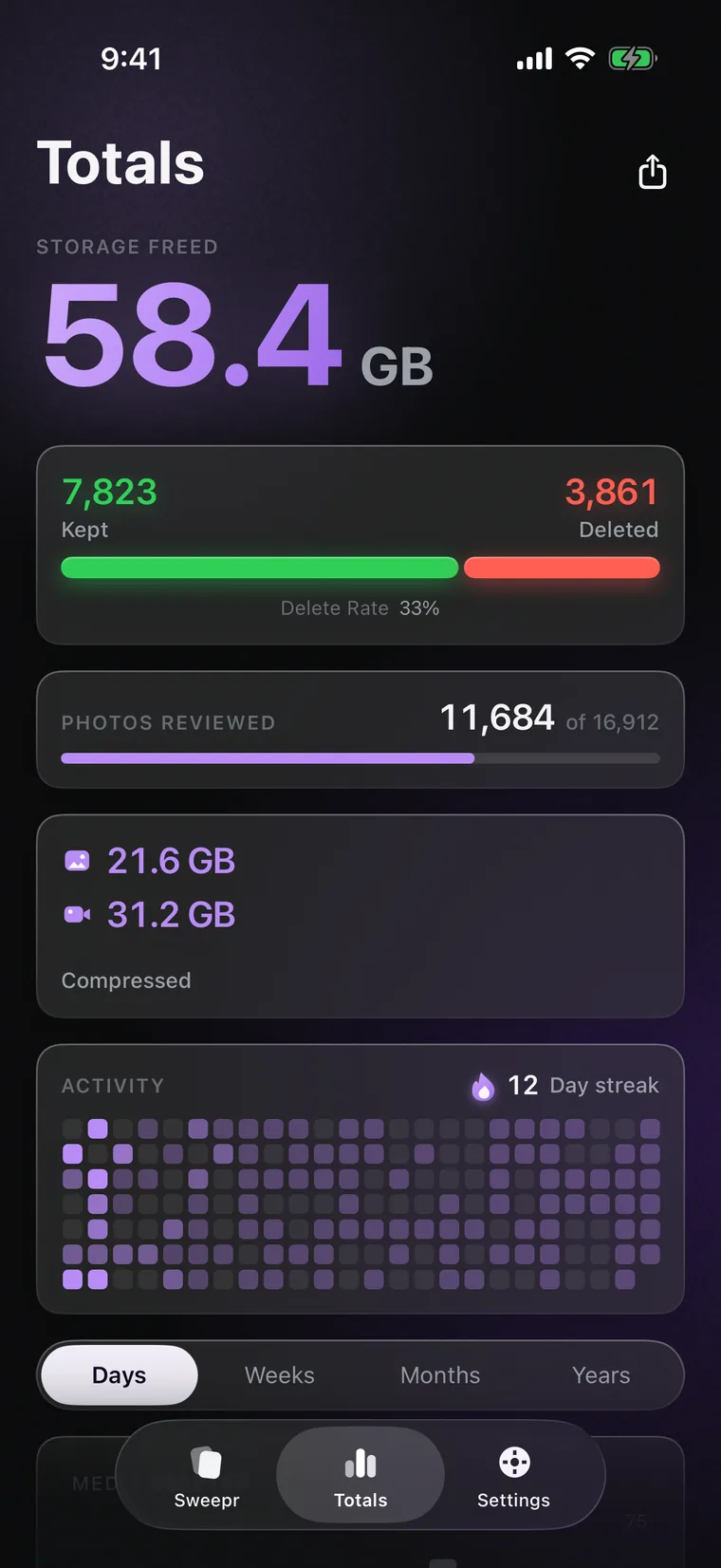
Totals keeps count of everything: space freed, photos kept and deleted, how much of the library you have been through, and what compression and trimming saved, photos and videos apart. It also points at what is still left to free, and makes a card you can share.

  • Space freed, kept against deleted, and your delete rate
  • Pro adds the day streak, the activity map and charts by day, week, month and year
  • Nothing here leaves the phone unless you share the card yourself
Totals: space freed, kept against deleted, photos reviewed, what compression saved, and the activity map

Privacy

Nothing you own leaves the device.

Not a photograph, not a video, not a filename, not a figure from your Totals. Sweepr has no server of its own to send any of it to. There is no account to create, no analytics SDK, no advertising identifier. Compression, trimming and duplicate detection all run on the phone. The only times anything leaves the device are when you buy or restore Pro, which goes through Apple and RevenueCat, and when a photo you asked for lives in iCloud rather than on the phone, which iOS downloads for you.

No accountNothing to sign up for and nothing to sign in to.
No analyticsNo usage tracking, no crash SDK reading your library, no advertising identifier.
On deviceCompression, trimming and duplicate detection happen on your iPhone or iPad. Photos are never uploaded.
iCloud stays yoursIf a photo lives in iCloud, Sweepr asks iOS to fetch it, exactly as the Photos app does, under your own iCloud account. The Wi-Fi only switch keeps those downloads off cellular data while you browse, compress and share. It does not yet cover playing a video inside the card.

Early testers

What the first users said.

Every quote below is real and from a real person, but all six are friends of the developer who were given Sweepr free of charge, and the names shown are not their real names, because none of them has agreed to be identified. Quotes are shortened for length, and the figures in them are what those particular libraries gave back, not a typical result. They were written about the first version of Sweepr, before 2.0. These are not App Store reviews, and Sweepr has no rating to show yet.

I shoot RAW and I had made peace with the fact that my phone would just always be full. Ran the compression deck over a year of photos and got back nineteen gigabytes. I still cannot tell the difference on any of them.
AntonShoots RAW on an iPhone 15 Pro
The videos were the thing. Two hours of my kid learning to walk, thirty gigabytes, and there is no universe where I delete that. Compressed the lot to 1080p. It is my kid learning to walk. It does not need to be 4K.
MartaParent, 128 GB iPhone
Every other cleaner I tried opens with a grid of two thousand thumbnails and a Select All button, and I close it immediately. This one shows me one photo and asks one question. I got through four years in a week.
IlliaNine years of photos
The part that sold me is that it puts the original in Recently Deleted instead of just overwriting it. I checked. Thirty days to notice if I hated the result. I did not hate the result.
KaterynaCareful with her library
I did not want a photo app that phones home. Turned on airplane mode, compressed two hundred photos, everything worked. That is the whole review.
DmytroReads privacy policies
Went from 4 GB free to 61 GB free without deleting a single photo I wanted to keep. My wife thinks I bought more storage.
Pavlo256 GB iPhone, full since 2023

Questions

Straight answers.

How do I free up iPhone storage without deleting my photos?

Compress them. Sweepr gathers the photos above a size you choose into a deck of their own, and one tap on Compress saves a lighter copy in the original's place: same resolution, same date, same location, same albums. How much comes back depends on the file. A heavy ProRAW frame, a PNG screenshot or a long 4K clip can give back a third of its size or more, while a photo already stored as efficient HEIC often has little left in it, and then Sweepr leaves it alone and says it is already small enough. For long videos there is trimming as well.

Does compressing a photo lower its resolution?

No. A compressed photo comes out at exactly the resolution it went in at. Compression changes how efficiently the pixels are stored, not how many of them there are. A 48 megapixel shot is still 48 megapixels afterwards, which is why it looks the same when you zoom in.

What happens to the original file?

It goes into Sweepr's trash as soon as its lighter copy is ready, next to anything you swiped left, and until you leave the deck you can restore it from there. When you leave, iOS asks once whether to delete the originals, and confirming is what frees the space. After that they are in Recently Deleted in the Photos app, the same as anything else you delete on an iPhone.

Can Sweepr compress video?

Yes, and video is usually where the space actually is. One minute of 4K costs about 170 megabytes at 30 frames per second, and roughly 400 megabytes at 60. Keep a clip at its own size and just make it lighter, or step it down to 1080p or 720p. Choose the quality, Same as original, Balanced or Compact, and keep the frame rate or drop it to 30 or 24. If a clip is already efficient, Sweepr says so instead of spending minutes re-encoding it. The video stays in your library, on the same date, in the same albums.

Can I trim a video in Sweepr?

Yes. Choose Trim from the ✦ button on a video card and drag the handles to the part you want to keep. The trimmed copy takes the original's place, and the original goes into the trash with everything else. You can compress the trimmed copy in the same step. Three trims are free, and Pro makes them unlimited.

Does Sweepr find duplicate photos?

Yes, since version 2.0. Duplicates & Similar finds exact copies and photos that are nearly the same, a burst or the same picture saved twice, and puts each group side by side. You choose what stays and the rest goes into the trash, so nothing is removed without you seeing it. The comparison runs on the phone, and it is free.

Does Sweepr use AI to decide what to delete?

No. Nothing in Sweepr guesses which of your photos are bad. It shows you each one and you decide. Duplicates & Similar groups the photos that look alike, and which one stays is still up to you.

Does Sweepr upload my photos anywhere?

No. Sweepr has no server of its own, no analytics and no advertising identifier, and your photos are never uploaded anywhere. Reviewing, deleting, compressing and trimming anything already on the device works with no network at all. Two things do need one, and neither involves your library: buying or restoring Pro, which goes through Apple and RevenueCat, and downloading a photo that lives only in iCloud, which iOS fetches for you exactly as the Photos app does.

When will Sweepr not free up much space?

Sweepr gives back little from a library that is already efficient. Three cases: photos shot on an older iPhone at 8 or 12 megapixels are small to begin with; anything already stored as HEIC at a high quality setting has almost nothing left to remove, and Sweepr will say so rather than rewrite it; and a library that is mostly short clips and screenshots has its weight spread thinly, so the wins come a megabyte at a time. The rule of thumb is that compression pays off when a handful of files are very large, not when thousands are moderately large. Go through one month, look at Totals, and you will know within a few minutes whether it is worth continuing. Live Photos are a separate case: Sweepr never compresses them, because that would break the pairing between the still and its motion.

Why is deletion not working for me?

Almost always because Sweepr was given limited photo access instead of full access. With limited access iOS lets an app see the photos you picked but silently refuses every deletion, with no error message. Open Settings, Apps, Sweepr, Photos, and choose Full Access. Sweepr still sends nothing anywhere; full access is what iOS requires before any app is allowed to delete.

How much does Sweepr cost?

Sweepr is free to use, and that includes compression, Duplicates & Similar and the trash. The free version gives you 50 swipes a week, and compressing a photo or a video spends one of them like any other decision. Trimming has three free tries. Pro removes both limits and adds the day streak, the activity map and the charts in Totals. It comes as a weekly, monthly or yearly subscription, or as Lifetime, a one-time purchase that is not a subscription. The App Store shows the price in your currency before you buy.

Which devices does Sweepr run on?

iPhone and iPad with iOS 17 or later. On iPad it has a layout of its own and turns to landscape. Sweepr speaks more than 30 languages, Arabic and Hebrew included, and follows your system language.

Will compressing photos hurt the quality of my prints?

At the maximum quality setting, which is the default, the difference is not visible on screen and does not affect a normal print. If you have files you want untouched, raise the size threshold so they are never offered for compression, or tap Keep on them in the compression deck, which leaves the file exactly as it is.

More from the same developer

Two other small apps.

Built by one person, with the same rules: no account, no tracking, no subscription traps.

Your storage is full. Your photos do not have to go.

Download Sweepr, open one month, and see what comes back.